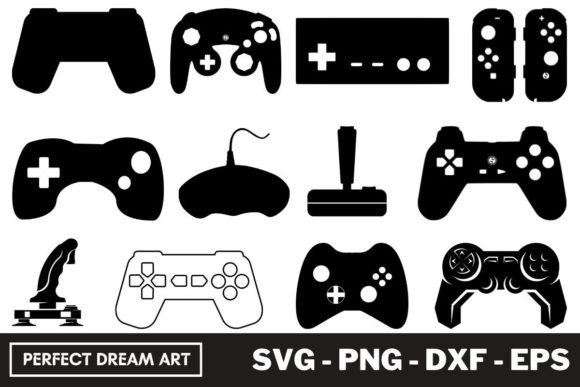
Game Controller Silhouette Bundles: A Hands-On Embroidery Review
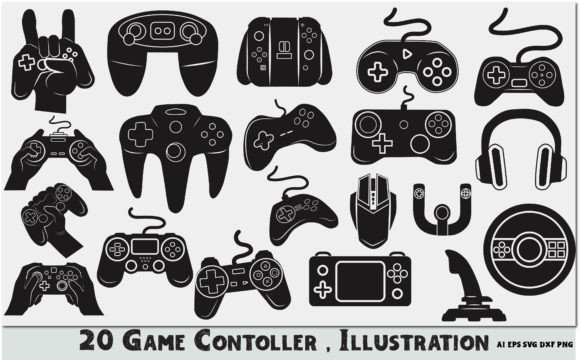
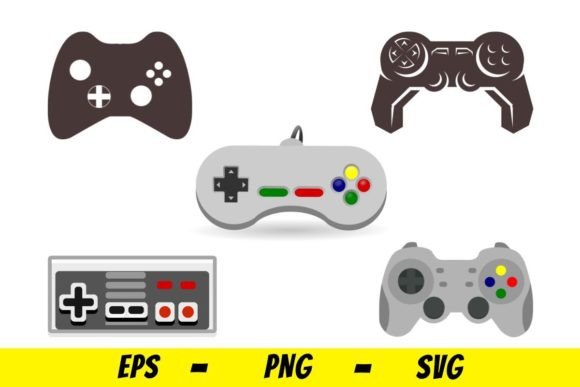
When I first opened the Game Controller Silhouette Bundles, I was struck by how clean and purposeful each shape felt. This isn't a set of overly intricate, fussy outlines. It's a focused collection of twelve controller silhouettes that land squarely in the sweet spot between recognizable form and embroidery-friendly simplicity. The mood is modern, slightly nostalgic, and immediately functional. As someone who has stitched hundreds of digital embroidery files across every fabric imaginable, I can tell you this set has a clear visual personality: it's bold, readable, and built for real projects. The silhouettes vary in orientation and proportion, giving you options for horizontal layouts, vertical accents, and standalone patches. There's a deliberate lack of clutter here, which is exactly what you want when you're planning to stitch something that needs to read clearly at a glance.
I immediately thought of a custom embroidered tote bag for a gaming cafe or a birthday gift for a serious player. The shapes are confident without being aggressive, and they carry a unisex appeal that works for adult apparel, teen accessories, and even children's items. The Game Controller Silhouette Bundles feel like they were designed with production in mind, not just screen display. That's a distinction I notice quickly. Many silhouette sets look great on a monitor but fail in the hoop because of tiny gaps, weak anchor points, or excessive detail. This set avoids those traps. The lines are clean, the curves are smooth, and the density appears well balanced for a variety of stitch types.
Real Project Use: From Digital File to Stitched Product
I decided to test one of the larger controller silhouettes on a mid-weight cotton sweatshirt. My goal was to create a sample piece for a client who runs a small esports merchandise shop. The silhouette I chose had a classic handheld controller profile with subtle joystick and button cutouts. I used a medium-weight cutaway stabilizer and a standard 60/40 polyester cotton blend thread in black on a heather gray garment. The shape stitched out cleanly in a satin stitch at about 4mm width, with no pull or distortion. The inner cutouts were wide enough that the needle didn't struggle with tight corners, and the corners themselves were rounded just enough to avoid thread buildup. This is critical when you're stitching multiple units for a small business. If a design causes thread breaks or fabric puckering on every second piece, it's not worth the file cost regardless of how good it looks on screen.
For a second test, I used a smaller silhouette from the set on a cotton twill cap. Curved surfaces like caps are unforgiving. A design that works perfectly on a flat garment can collapse or distort on a structured front panel. The Game Controller Silhouette Bundles handled this well. The silhouette was compact enough to fit within the cap's front curve without needing to be scaled down excessively. I used a tear-away stabilizer and a tight satin stitch, and the shape held its form. The cap ended up looking professional and clean, exactly the kind of product that sells well at a craft fair or in an Etsy listing. The client was pleased, and I felt confident that the design would hold up through repeated wear and washing.
Strengths Across Apparel, Patchwork, and Home Decor
This set of Graphics is versatile enough to serve multiple product categories. For Illustrations that are meant to be embroidered, versatility is a major asset. I can see the Game Controller Silhouette Bundles working well on:
- Custom apparel: T-shirts, sweatshirts, hoodies, and jackets for gaming events, birthday gifts, or team uniforms.
- Embroidered patches: Iron-on or sew-on patches for bags, jackets, and backpacks. The silhouettes are bold enough to stand alone as patch designs.
- Tote bags: A single large silhouette centered on a canvas tote makes a strong, minimalist statement.
- Baby and kids items: Smaller silhouettes work well on onesies, rompers, and bibs for little gamers in training.
- Home decor: Pillow covers, tea towels, or small wall hangings for a game room or man cave.
- Holiday and personalized gifts: Embroidered stockings, gift bags, or custom ornaments for the gamer in your life.
- Small shop merchandise: Perfect for Etsy sellers, craft fair vendors, and boutique brands looking to add a gaming touch to their lineup.
Each silhouette is distinct enough that you can mix and match them across a product line without repeating the exact same shape. This gives a small business owner a cohesive look without monotony. For a holiday gift set, you could stitch one controller silhouette on each of four different kitchen towels and sell them as a bundle. The consistency of the style ties the set together, while the variation in poses keeps each piece interesting.
Where to Use This Design Carefully
No embroidery file is perfect for every situation, and the Game Controller Silhouette Bundles has some considerations worth noting. The silhouettes are generally well proportioned, but if you scale them down too aggressively for small hoop sizes, the inner cutouts may become too narrow for a clean satin stitch. I recommend testing any silhouette at your intended size on scrap fabric before committing to a production run. For very small items like baby socks or tiny patches, you may need to choose a silhouette with minimal interior detail.
On highly textured fabrics like fleece, sherpa, or thick knits, the stitch density may cause the fabric to show through the cutouts. A heavier stabilizer or a layer of lightweight cutaway behind the design can help. On stretchy fabrics like jersey or rib knit, the satin stitch may pull the fabric if the tension is not adjusted. A fusible stabilizer or a no-show mesh can keep the shape crisp. For dark fabrics, use a light-colored thread or a metallic thread to make the silhouette pop. The contrast between the thread and the fabric is what makes a silhouette design work.
Curved surfaces like caps and curved visors demand extra attention. The larger silhouettes in the set may be too wide for a standard cap front without scaling. Always measure your hoop area and the cap's front panel before committing to a size. I also recommend testing the design on a spare cap first, as the curve can cause the needle to deflect on tight corners. If you're layering the design onto a garment with existing seams, pockets, or zippers, make sure the hoop can sit flat without interference.
Visual Appeal, Stitching Clarity, and Product Value
From a buyer's perspective, the Game Controller Silhouette Bundles delivers a clean, modern look that feels intentional. It's not a clip art leftover. It's a design asset that elevates the product it's applied to. When a customer sees a well-stitched controller silhouette on a sweatshirt or tote bag, they recognize the quality. The stitch clarity is high because the shapes are simple enough that the thread path is smooth and uninterrupted. There are no awkward direction changes or tiny islands that cause thread breaks. This means your finished product looks professional, which builds trust with your customers and encourages repeat business.
For an Etsy seller or craft business owner, the Game Controller Silhouette Bundles is a solid addition to your design library. It gives you a ready-to-use motif that doesn't require extensive editing or digitizing skills. You can open the file, hoop your fabric, and stitch. The time saved on design prep is time you can spend on production, marketing, or customer service. The set also works well for printable mockups if you're creating digital product previews for your shop. The silhouettes are clean enough to render well in a digital mockup, which helps your listings stand out.
Practical Embroidery Designer Notes
Before you start stitching with the Game Controller Silhouette Bundles, here are a few practical steps I recommend based on my own testing:
- Test on scrap fabric first. Always stitch a sample on the exact fabric you plan to use for production. This confirms stitch density, thread tension, and size.
- Check thread color contrast. A silhouette design relies on high contrast between the thread and the fabric. Test both light-on-dark and dark-on-light options to see which reads best.
- Review stitch density. If the density feels too tight for your fabric, consult your machine's manual or your digitizing software for density adjustment options. For most mid-weight fabrics, the default density should be fine.
- Confirm hoop size. Measure the largest silhouette in the set against your hoop's maximum stitch area. Do not scale the design beyond its intended dimensions without testing.
- Inspect small details. If any inner cutouts are narrower than 2mm, consider whether they will stitch cleanly. If not, choose a different silhouette from the set.
- Test in black and white mockups. This helps you evaluate the silhouette's shape and proportion without color distraction. If it reads well in grayscale, it will likely read well in any color.
- Compare light and dark fabric backgrounds. A silhouette that works beautifully on white may disappear on black. Always check both.
- Use proper stabilizer. For most applications, a medium-weight cutaway or tear-away stabilizer is appropriate. For stretchy or delicate fabrics, use a fusible or no-show stabilizer.
- Check licensing before selling. Since this is a digital download, confirm the terms for commercial use. Some embroidery files allow unlimited commercial use, while others require a license for products sold in quantity. Always verify before stitching for sale.
- Test the design in different orientations. Some silhouettes may work better horizontally on a cap, while others look best vertically on a sleeve or pant leg. Experiment before committing.
One more thing: the zip file format means you'll need to extract the files before use. This is standard for digital embroidery files, but it's worth noting for anyone who is new to digital downloads. Make sure you have extraction software on your computer, and organize your files by size or orientation for easy access during production.
Final Thoughts for the Craft Business Owner
The Game Controller Silhouette Bundles is a practical, well-executed set of design assets. It's not flashy, and it doesn't pretend to be something it's not. It's a collection of solid, usable silhouettes that will serve anyone who needs a clean gaming motif for embroidery. Whether you're producing custom apparel, handmade gifts, or small shop merchandise, this set gives you a reliable foundation. The shapes are friendly, the stitching is straightforward, and the results are professional. I've seen too many digital files that look promising but fail in the hoop. This one earns its place in the project folder.
If you're an Etsy seller looking to expand your product line, a craft business owner testing new designs, or a hobbyist creating personalized gifts, the Game Controller Silhouette Bundles is worth a close look. Test it, stitch it, and see how it performs on your own products. I think you'll find it as reliable as I did.